
Adobe releases Magento security patches every month, and every few years one of them turns a normal week into an incident. Most merchants know they should apply them. Far fewer have a routine that actually does it, month after month, without depending on someone remembering.
This guide describes how we handle Magento security patches across the Adobe Commerce and Magento Open Source stores we support: how to read a bulletin, which patch to apply, how fast it should reach production, and how to keep a store from quietly falling behind. Recent bulletins serve as examples, but the routine is the point.
Start With the Bulletin, Not the Upgrade
Adobe publishes security bulletins for Adobe Commerce and Magento Open Source with an identifier such as APSB26-73. Each bulletin lists the CVEs it fixes, their CVSS scores, the affected versions, and a priority rating. The priority rating matters most, because it decides how the patch travels:
- Priority 1 means the vulnerability is being exploited, or is very likely to be. The patch goes to production on its own, the same day.
- Priority 2 and 3 mean there are no known exploits. The patch rides the next regular release, through staging with the rest of the work, and reaches production within about a week.
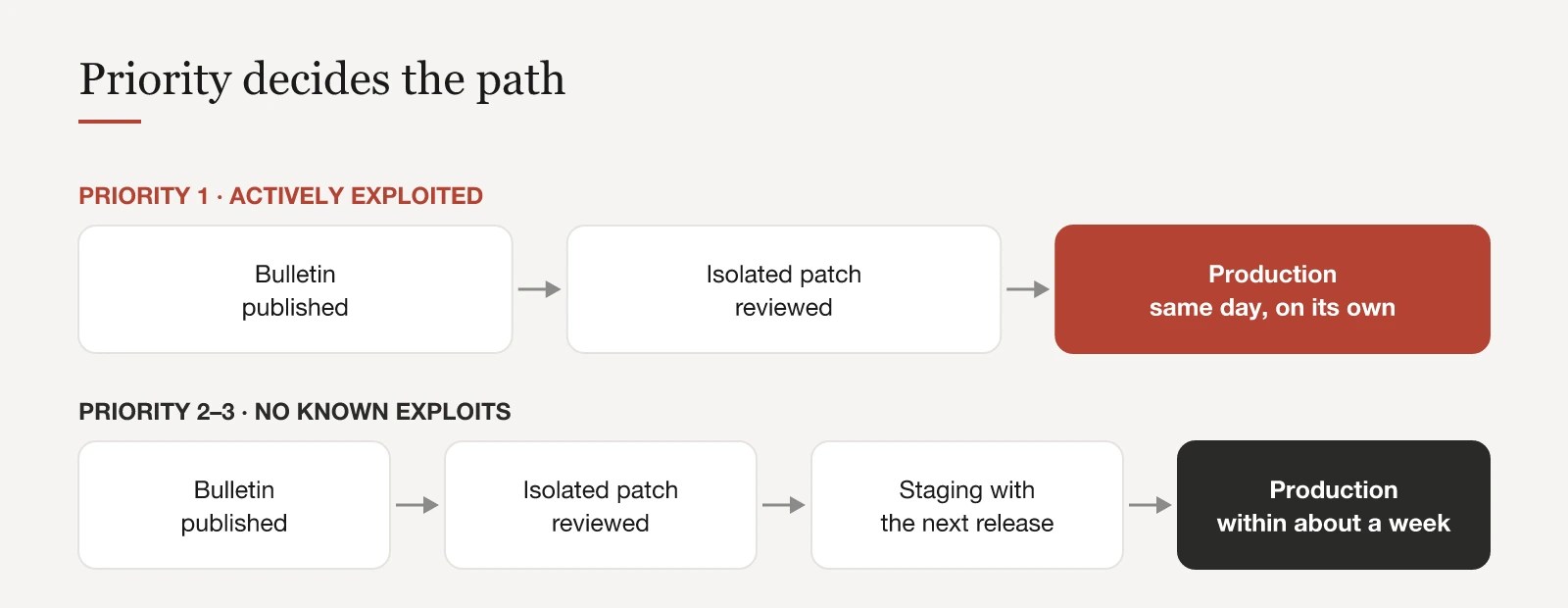
The two most recent bulletins show the difference. APSB26-73, published in July 2026, fixed fourteen CVEs, including a 9.6 privilege escalation through file upload and a 9.1 code execution flaw in webhooks. It was rated Priority 2, with no known exploits. Two months later, APSB26-146 fixed a single vulnerability, CVE-2026-75650, that let an unauthenticated attacker execute arbitrary code. It scored 10.0, was rated Priority 1, and Adobe confirmed it was already being exploited. Both affected every 2.4.x line from 2.4.4 to 2.4.9.
A Priority 2 rating does not mean the issues are minor. It means you have a little time. Stretching that week into a quarter turns a Priority 2 issue into a Priority 1 issue the moment someone publishes an exploit.
Know Your Exact Patch Level
For every bulletin, Adobe offers two routes. You can move to a new patch level for your release line, or you can apply an isolated patch on top of the version you already run. Both depend on knowing your exact version, such as 2.4.8-p5, not just “2.4.8”. Isolated patches and Adobe’s Cloud patch packages are keyed to specific patch releases, and the wrong assumption here means a patch that does not apply, or one that silently stops applying later.
For a monthly bulletin, the isolated patch is almost always the right first move. It closes the vulnerabilities without the dependency churn, regression testing and extension compatibility work of a version bump. The upgrade still happens, but on a schedule you choose, not one a bulletin forces on you. For an emergency, it is the only realistic option.
Keep Patches in Version Control
A patch applied by hand on a server disappears on the next deployment. Every patch should live in the repository and be applied by the build.
On Adobe Commerce Cloud there are three mechanisms, and keeping them separate is what lets you answer, at any time, which fixes a store carries and why:
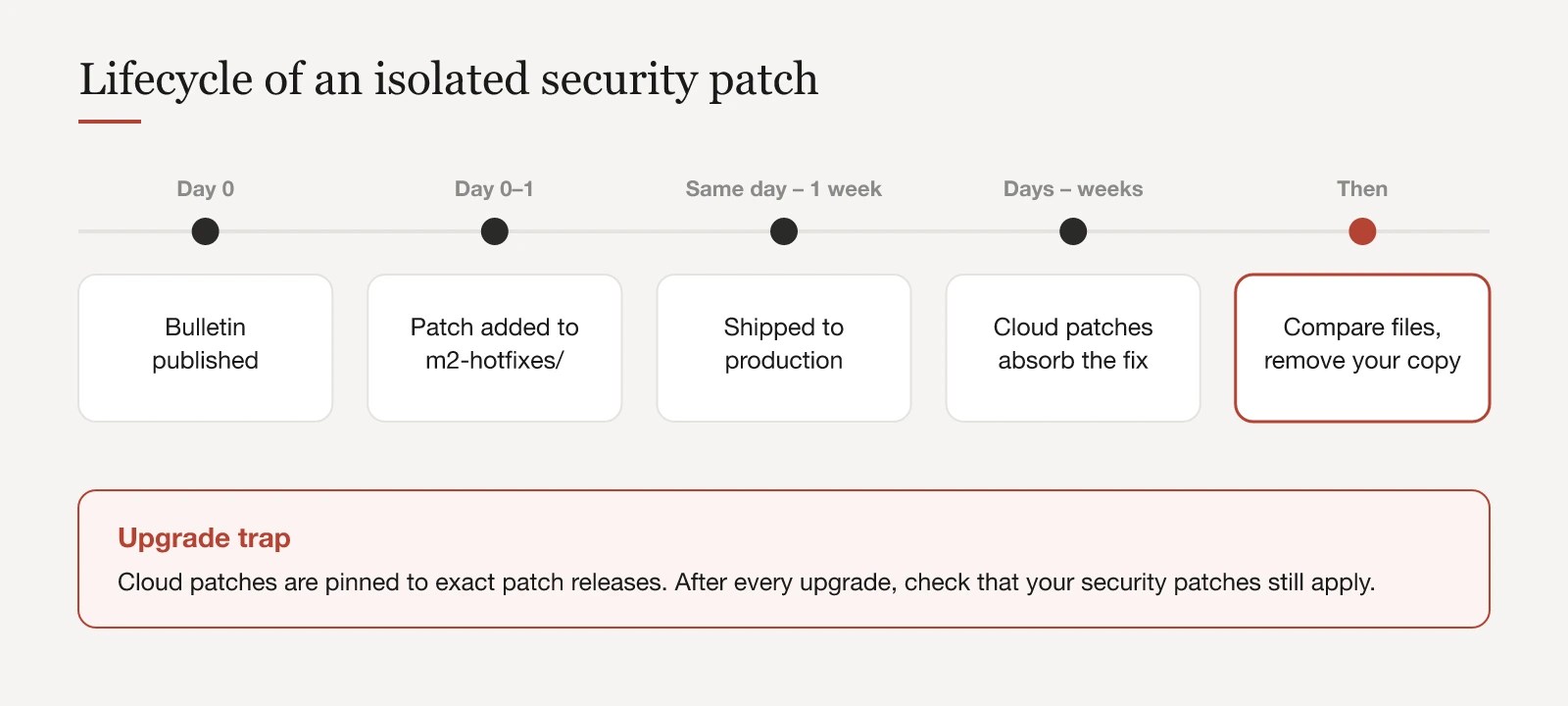
m2-hotfixes/: a directory in the project. Every patch file in it is applied automatically during each build. This is where isolated security patches go.magento/magento-cloud-patches: a package of required patches that Cloud applies to every project. Security fixes usually arrive here a few days to a few weeks after the bulletin.magento/quality-patches: Adobe’s catalogue of optional fixes, applied one by one through theQUALITY_PATCHESlist in.magento.env.yaml.

On self-hosted Magento, Composer-based patch tooling and Adobe’s Quality Patches Tool fill the same roles. The principle does not change: the patch is a file under version control, applied the same way in every environment.
Read the Diff, Then Test What It Touches
A security patch is still a code change, and we review it like one, including emergency patches. The review is usually short, and it pays off twice: it tells you what to test, and it tells you what an attacker could have done.
The July 2026 isolated patch is a typical example. One part changed the product grid used in content staging, which rendered product names and SKUs as raw HTML. Anyone able to put markup into a product name could plant a stored XSS payload that would run in another administrator’s browser. Knowing that, the regression check is obvious: the staging product grid in the admin, plus the other area the patch touched. Testing the entire store would take longer without making anyone safer.
The September zero-day patch shows the second benefit. Among other fixes, it stopped request data from being written unescaped into error report files on disk, which could leave executable PHP behind. That single detail changes what you check afterwards: not only logs, but the filesystem. Our Magento security audit checklist covers that part in detail.
A security review is also a good moment to check what your tooling cannot see. Magento ships some JavaScript libraries, such as underscore.js, as copies in lib/web rather than as Composer dependencies. Dependency scanners and update bots never touch them, so advisories for those libraries need a manual update.
Emergency Patches: Speed Is Prepared in Advance
When a Priority 1 bulletin appears, there is no time to design a process. APSB26-146 was released on a Sunday. Stores that were patched within hours already had three things in place:
- patches as files in version control, applied by the build
- a deployment path that can carry one small change to production on its own, without a queue of unrelated work
- someone who reads Adobe bulletins on the day they appear, weekends included
If your only route to production is a weekly release with twenty unrelated changes, an emergency patch either waits or drags untested work with it. Neither is acceptable for an actively exploited vulnerability.
Remove Your Patch When Adobe Catches Up
An isolated patch should be temporary. On Adobe Commerce Cloud, the same fix usually appears later in magento-cloud-patches. After APSB26-146, that took less than a week. The July 2026 fixes arrived a month later, bundled as a single Cloud patch.
When that happens, compare the files. If the package version matches yours, apart from line offsets or git index lines, delete your copy and record in the commit why. Duplicates rarely break a build, because the Cloud patch applier recognises a patch that is already applied. But they drift, and they make it impossible to say which copy is authoritative.
Read the package diff instead of just accepting the update. Patch packages sometimes carry more than PHP changes. The release that absorbed the July 2026 fixes also added a deny rule for /media/customer_address/ to the nginx configuration sample. If your server configuration is managed separately, that kind of change needs a deliberate follow-up.
The Upgrade Trap
Cloud patches are often pinned to exact patch releases. The CVE-2026-75650 fix, for example, was constrained to 2.4.4-p18, 2.4.5-p17, 2.4.6-p15, 2.4.7-p10, 2.4.8-p5 and 2.4.9. If you upgrade to a release the package does not list yet, the patch silently stops applying, and the vulnerability is back until the package catches up.
Every upgrade plan should therefore include one extra check: do the security patches you rely on still apply to the target version? The build log will tell you, if someone reads it.
Let the Tooling Carry the Routine
Anything in this process that depends on memory will eventually be forgotten. Two small changes remove most of that risk:
- Make
magento-cloud-patchesa direct requirement of your project instead of a transitive dependency, so its version is visible and owned. - Configure an update bot such as Renovate to update
magento-cloud-patchesandquality-patchestogether, in a single pull request.
When Adobe ships a new batch, the pull request appears on its own. The review is the same every time: what is new, does any of it duplicate a patch we already carry, and does any of it change server configuration.
Magento Security Patch Checklist
- Read each bulletin on the day it is published. Note its priority and whether exploits are known.
- Know your exact patch level.
- Apply the isolated patch for that level. Schedule the version upgrade separately.
- Keep every patch in version control and let the build apply it.
- Read the diff and test the areas it touches.
- Ship Priority 1 at once and on its own. Let Priority 2 ride the next release, within about a week.
- When the official package absorbs a fix, compare the files and remove your copy.
- After every upgrade, check that your security patches still apply.
- Let automation open the pull requests for patch packages.
None of this is complicated. What matters is that it runs the same way every month, including the months when nothing seems urgent. If your store is several bulletins behind, or nobody can say which patches it actually carries, our Magento support work usually starts with exactly that inventory.
